> For the complete documentation index, see [llms.txt](https://docs.akto.io/llms.txt). Markdown versions of documentation pages are available by appending `.md` to page URLs; this page is available as [Markdown](https://docs.akto.io/traffic-connector/ebpf/ebpf.md).
# Connect Akto with eBPF
## Introduction
Connecting with Akto's eBPF traffic collector is recommended for mTLS systems.
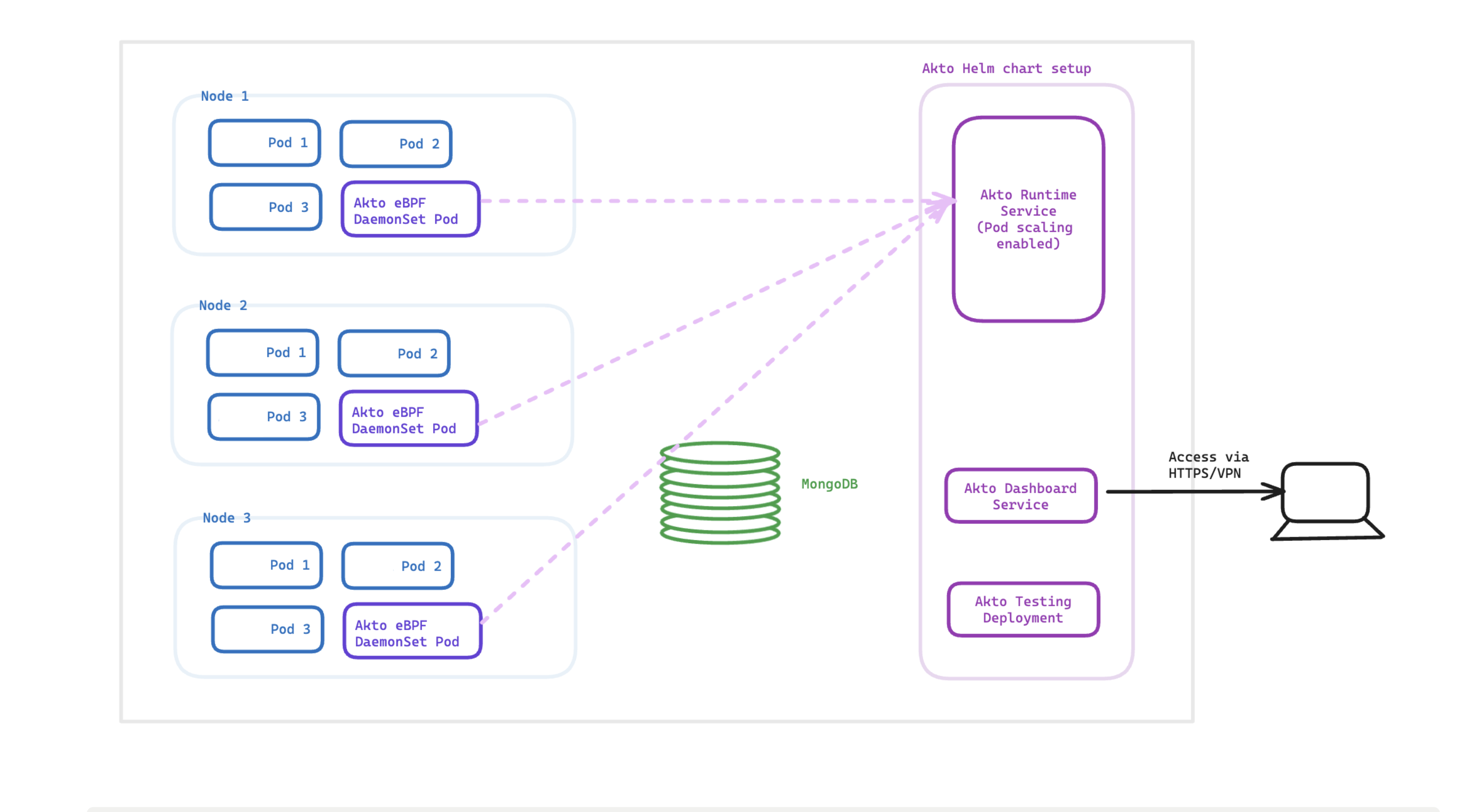
For a better understanding, here's an architecture diagram of the setup.
ebpf Deployment
## Adding Akto traffic collector
{% stepper %}
{% step %}
Setup Akto data processor using the guide [here](/getting-started/quick-start-with-akto-cloud/hybrid-saas.md)
{% endstep %}
{% step %}
Apply the Daemonset configuration given below using `kubectl apply -f akto-daemonset-config.yaml -n `. You will find `AKTO_NLB_IP` after setting up Akto data processor, as mentioned above.
{% hint style="success" %}
### eBPF CO-RE Image Option
Alternatively, you can use the eBPF CO-RE image for environments where kernel headers are unavailable or kernel versions vary across nodes.
```
public.ecr.aws/aktosecurity/mirror-api-logging:k8s_ebpf_core
```
Just update the `image` field in the YAML below with the CO-RE image URL to use this variant.
{% endhint %}
```yaml
apiVersion: apps/v1
kind: DaemonSet
metadata:
name: akto-k8s
namespace: {NAMESPACE}
labels:
app: akto-collector
spec:
selector:
matchLabels:
app: akto-collector
template:
metadata:
labels:
app: akto-collector
spec:
hostNetwork: true
dnsPolicy: ClusterFirstWithHostNet
hostPID: true
containers:
- name: mirror-api-logging
image: public.ecr.aws/aktosecurity/mirror-api-logging:k8s_ebpf
resources:
limits:
cpu: 500m
memory: 1Gi
requests:
cpu: 50m
memory: 50Mi
env:
- name: AKTO_TRAFFIC_BATCH_TIME_SECS
value: "10"
- name: AKTO_TRAFFIC_BATCH_SIZE
value: "100"
- name: AKTO_KAFKA_BROKER_MAL
value: ":9092"
- name: NODE_NAME
valueFrom:
fieldRef:
fieldPath: spec.nodeName
- name: POD_NAME
valueFrom:
fieldRef:
fieldPath: metadata.name
securityContext:
capabilities:
add:
- SYS_PTRACE
- SYS_ADMIN
privileged: true
volumeMounts:
# needed to load kernel headers
- name: lib-modules
mountPath: /lib/modules
readOnly: true
# needed to trace kernel events
- name: sys-kernel
mountPath: /sys/kernel
readOnly: true
- name: host
mountPath: /host
readOnly: true
volumes:
- name: sys-kernel
hostPath:
path: /sys/kernel
- name: lib-modules
hostPath:
path: /lib/modules
- name: host
hostPath:
path : /
```
{% endstep %}
{% step %}
For example, if you've deployed `akto-mini-runtime` using akto's helm charts in `akto` namespace, the `AKTO_NLB_IP` would be `akto-mini-runtime-mini-runtime.akto.svc.cluster.local` .
{% endstep %}
{% step %}
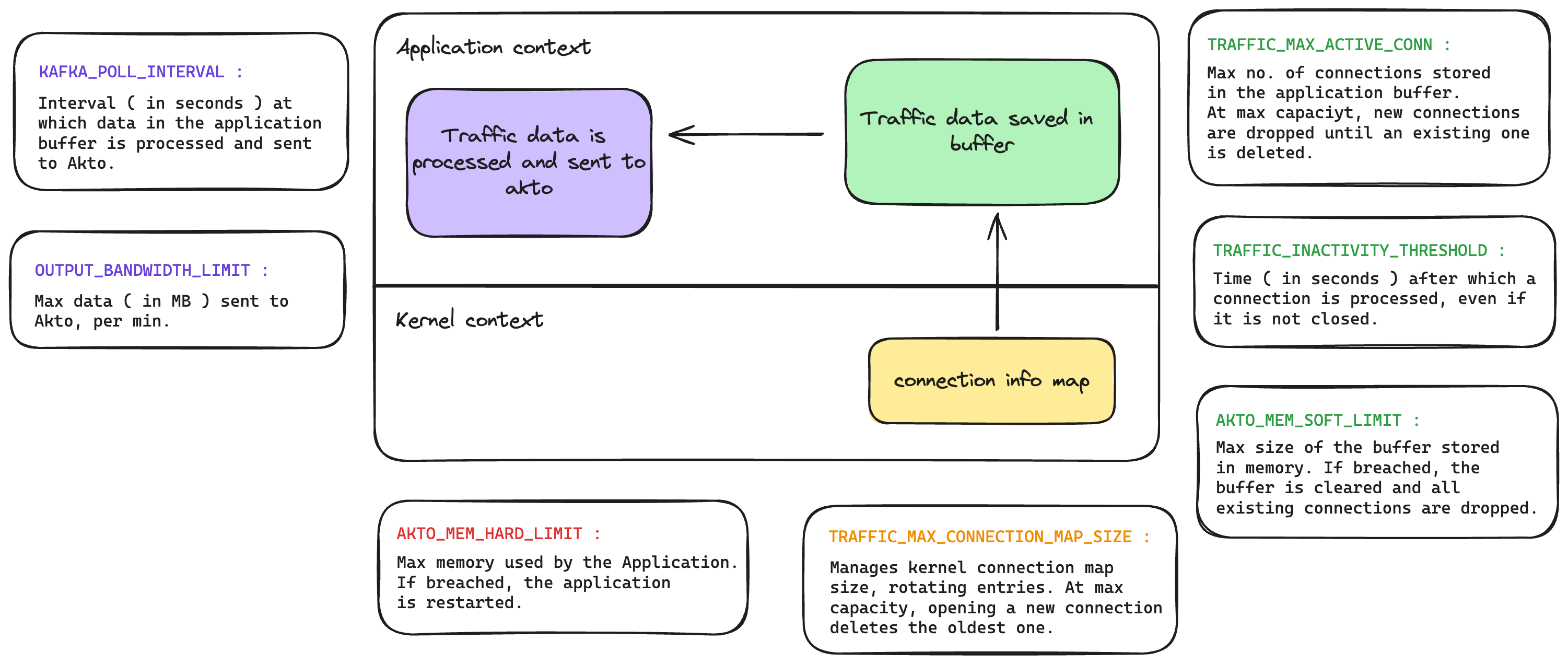
You can add and configure the env variables below to control the daemonset. Here's a diagram of how the module processes traffic:
eBPF Traffic Processing
```yaml
# This helps in filtering traffic sent to akto, based on certain headers. Here is an example for sending traffic only for 'bookinfo' namespace in an istio setup.
- name: AKTO_MODULE_DISCOVERY_CONFIG
value: '[{"key":{"eq":"x-forwarded-client-cert","ifAbsent":"reject"},"value":{"regex":".*bookinfo.*"}}]'
# Time limit ( in seconds ) after which, a traffic stream is processed and marked inactive. The same stream, is not processed again.
- name: TRAFFIC_INACTIVITY_THRESHOLD
value: "3"
# Max traffic connections kept in memory
- name: TRAFFIC_MAX_ACTIVE_CONN
value: "4096"
# Make this flag true to disable egress traffic. It is recommended to keep this false.
- name: TRAFFIC_DISABLE_EGRESS
value: "false"
# Max mem usage after which the pod restarts ( in MB )
- name: AKTO_MEM_THRESH_RESTART
value: "500"
# Max limit of traffic buffer kept in memory ( in MB )
- name: TRAFFIC_BUFFER_THRESHOLD
value: "400"
# Ignore traffic coming from unresolved IPs, i.e. requests with host header of the format
- name: AKTO_IGNORE_IP_TRAFFIC
value: "false"
# Ignore traffic coming from AWS cloud metadata IP
- name: AKTO_IGNORE_CLOUD_METADATA_CALLS
value: "false"
# If you only want to trace traffic for which SSL termination happens at proxy/service.
- name: CAPTURE_ALL
value: "true"
```
{% endstep %}
{% step %}
You can check your `API inventory` on Akto dashboard to see endpoints being discovered.
{% endstep %}
{% endstepper %}
## Automated tags
Use automated tags to see where each API collection came from. There are two options, and you can use both.
* **Tag by source (collector):** set `AKTO_INJECT_TAGS` on this collector. Use `key=value` pairs separated by `;`, for example `SOURCE=cluster-a;team=payments`. Each pair becomes a tag on the collections created from this collector's traffic. Use a different value for each cluster.
* **Tag by environment (mini-runtime):** set the `VPC_ID` environment variable on the mini-runtime that receives this collector's traffic. Its value becomes the `env` tag on those collections.
Learn more in [Automated Tags](/api-inventory/how-to/set-tags.md#automated-tags).
{% hint style="info" %}
To tag by source, add this to the `env` section of the collector config above:
```yaml
- name: AKTO_INJECT_TAGS
value: "SOURCE="
```
For all options and examples, see [Automated Tags](/api-inventory/how-to/set-tags.md#automated-tags).
{% endhint %}
## Frequently Asked Questions (FAQs)
**The traffic will contain a lot of sensitive data - does it leave my VPC?**
Data remains strictly within your VPC. Akto doesn't take data out of your VPC at all.
**Does adding DaemonSet have any impact on performance or latency?**
Zero impact on latency. The DaemonSet doesn't sit like a proxy. It works on eBPF technology, which works on traces function calls at kernel level. It is very lightweight. We have benchmarked it against traffic as high as 20M API requests/min. It consumes very low resources (CPU & RAM).
**How can I control logs generated by akto's eBPF traffic collector ?**
You can utilize the `AKTO_LOG_LEVEL` environment variable, which accepts `DBEUG`, `INFO`, `WARN`, `ERROR`, `OFF` as log levels.\
Default level is set to `WARN`.
**I don't see my error on this list here.**
Please send us all details at or reach out via Intercom on your Akto dashboard. We will definitely help you out.
### Get Support for your Akto setup
There are multiple ways to request support from Akto. We are 24X7 available on the following:
1. In-app `intercom` support. Message us with your query on intercom in Akto dashboard and someone will reply.
2. Join our [discord channel](https://www.akto.io/community) for community support.
3. Contact `help@akto.io` for email support.
4. Contact us [here](https://www.akto.io/contact-us).