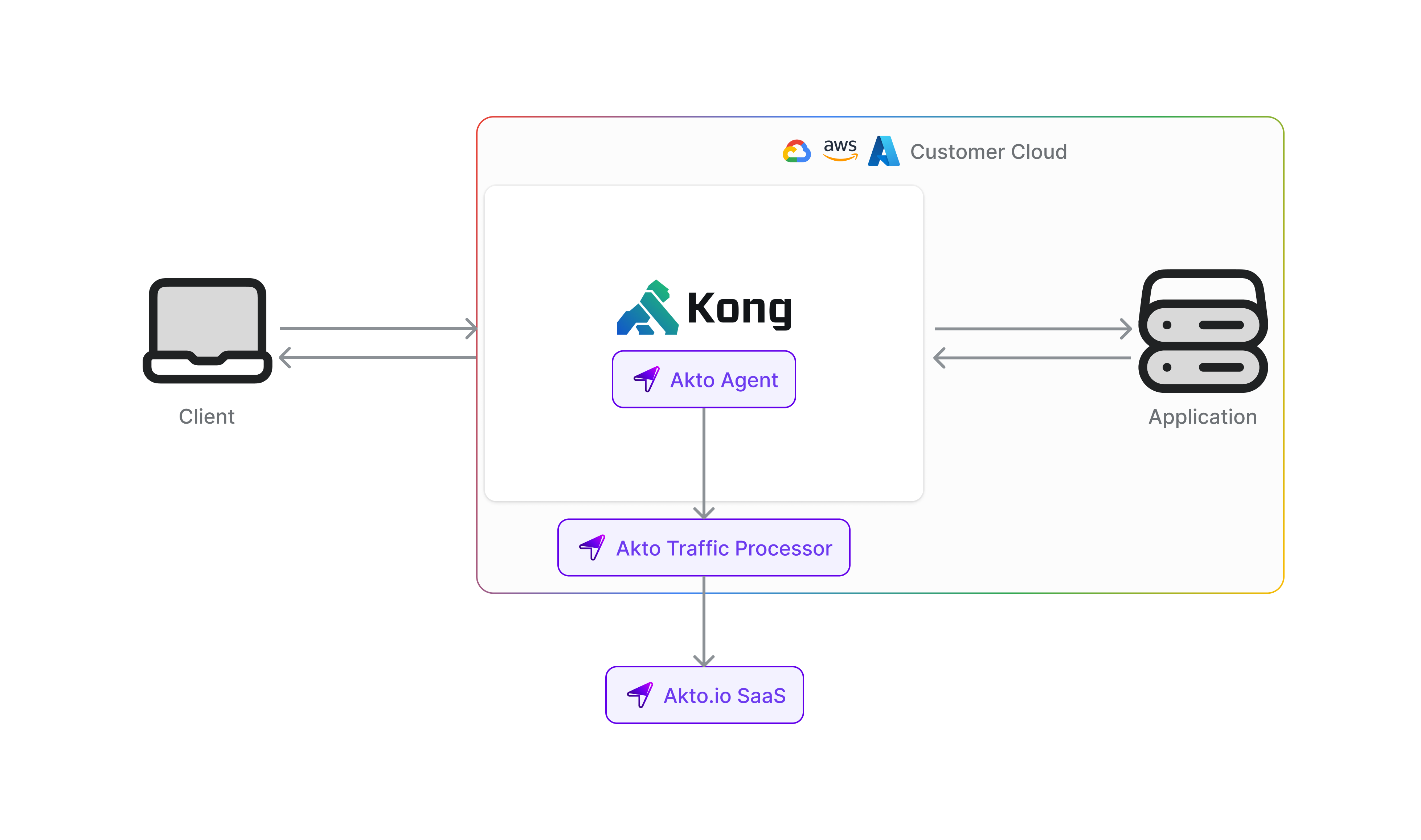
> For the complete documentation index, see [llms.txt](https://docs.akto.io/llms.txt). Markdown versions of documentation pages are available by appending `.md` to page URLs; this page is available as [Markdown](https://docs.akto.io/traffic-connector/api-gateways/connect-akto-with-kong.md).
# Connect Akto with Kong
Discover and monitor every API flowing through your **Kong API Gateway** with Akto. The `akto-api-discovery` plugin captures request and response metadata from traffic passing through Kong and asynchronously ships it to Akto's ingest service for automatic API discovery, schema inference, sensitive data detection, and security testing. The plugin is built around a strict guarantee: **it never affects the original request, response, status code, or latency** — even if the Akto backend is slow or completely unreachable.
## Prerequisites
Before you begin, make sure you have:
* Kong Gateway **2.0 or later** already running with your services and routes configured
* Access to Kong's Admin API (default: `http://localhost:8001`)
* A server or Kubernetes cluster to host the Akto ingest backend
* Your **Akto API Token** (available from your Akto dashboard → Quick Start → Hybrid SaaS → Connect → Copy your `databaseAbstractorToken`)
***
## Step 1: Install the Plugin in Kong
{% stepper %}
{% step %}
**Download the Plugin Files**
Clone the Akto Kong integration repository:
```bash
git clone https://github.com/akto-api-security/kong-integration.git
cd kong-integration
```
Inside the `api_plugin/` directory you will find two files:
* `handler.lua` — plugin logic
* `schema.lua` — configuration schema
{% hint style="info" %}
You only need these two files. Nothing else from the repository is required for the plugin itself.
{% endhint %}
{% endstep %}
{% step %}
**Copy the Plugin Files into Kong**
Create the plugin directory inside Kong and copy both files into it:
```bash
mkdir -p /usr/local/share/lua/5.1/kong/plugins/akto-api-discovery
cp api_plugin/handler.lua /usr/local/share/lua/5.1/kong/plugins/akto-api-discovery/
cp api_plugin/schema.lua /usr/local/share/lua/5.1/kong/plugins/akto-api-discovery/
```
**Using Docker?** Mount the plugin directory as a volume instead:
```yaml
volumes:
- /path/to/kong-integration/api_plugin:/usr/local/share/lua/5.1/kong/plugins/akto-api-discovery:ro
```
{% endstep %}
{% step %}
**Register the Plugin with Kong**
Add `akto-api-discovery` to Kong's plugins list. How you do this depends on how Kong is configured:
**Via `kong.conf`:**
```
plugins = bundled,akto-api-discovery
```
**Via environment variable:**
```bash
KONG_PLUGINS=bundled,akto-api-discovery
```
{% hint style="info" %}
If you are using Docker Compose, set this as an environment variable on the Kong service.
{% endhint %}
{% endstep %}
{% step %}
**Restart Kong**
```bash
kong restart
```
Or if using Docker:
```bash
docker compose restart kong
```
{% endstep %}
{% endstepper %}
***
## Step 2: Enable the Plugin on Your Service or Route
You can attach the plugin to a specific service, a specific route, or globally across all traffic.
**Enable on a specific service** (recommended — scopes discovery to one upstream service):
```bash
curl -X POST http://localhost:8001/services//plugins \
--data "name=akto-api-discovery" \
--data "config.service_url=http://"
```
**Enable on a specific route:**
```bash
curl -X POST http://localhost:8001/routes//plugins \
--data "name=akto-api-discovery" \
--data "config.service_url=http://"
```
**Enable globally** (monitors all traffic through Kong):
```bash
curl -X POST http://localhost:8001/plugins \
--data "name=akto-api-discovery" \
--data "config.service_url=http://"
```
Replace `` with your Akto ingest service URL:
* **If Akto provided you a URL** (e.g., `https://17*******0-ingest.akto.io`), use that directly.
* **Otherwise**, complete Step 3 to self-host the backend and use the URL you get from there.
{% hint style="info" %}
**Configuration Parameters**
{% endhint %}
| Parameter | Required | Default | Description |
| ------------- | -------- | ------- | ---------------------------------------------------------------------------------------------------------------------- |
| `service_url` | Yes | — | Base URL of your deployed Akto ingest backend (e.g., `http://10.0.1.4:8080`). The plugin POSTs to `/api/ingestData`. |
| `timeout` | No | `30000` | Request timeout in milliseconds for the async ingest call. The plugin enforces a hard cap regardless of this value. |
| `log_level` | No | `warn` | One of `debug`, `info`, `warn`, `error`. Keep at `warn` in production; use `info` or `debug` only for troubleshooting. |
You can also configure the plugin via **Kong Manager UI**: go to **Plugins → New Plugin → search for `akto-api-discovery`**.
***
## Step 3: Deploy the Akto Ingest Backend
{% hint style="info" %}
If you already have the Akto ingest backend deployed (or have been given a `service_url` by your team), skip this step and use that URL directly in Step 2.
{% endhint %}
The ingest backend is a set of services that receive traffic metadata from the Kong plugin and store it for API discovery and analysis. You can deploy it using **Docker Compose** (any Linux VM) or **Helm** (Kubernetes).
### Option A: Docker Compose — Any Linux VM
This is the fastest way to get started. You need a Linux server with at least **4 vCPUs and 8 GB RAM**.
The Docker Compose file is available at:\
[`docker-compose-mini-runtime-data-ingestion.yaml`](https://github.com/akto-api-security/infra/blob/feature/quick-setup/docker-compose-mini-runtime-data-ingestion.yaml)
{% stepper %}
{% step %}
**Clone the Repository**
```bash
git clone -b feature/quick-setup https://github.com/akto-api-security/infra.git
cd infra
```
{% endstep %}
{% step %}
**Configure Environment Files**
Two env files must be present alongside the compose file before you start the services.
**`docker-mini-runtime.env`** — controls the runtime service. The only value you must change is your Akto API token:
```bash
# Create the file (it does not have a template to copy in this repo — create it fresh)
cat > docker-mini-runtime.env <
RUNTIME_MODE=hybrid
AKTO_THREAT_ENABLED=true
EOF
```
Replace `` with your token from the Akto dashboard.
**`data-ingestion-docker.env`** — controls the data ingestion service. No changes needed for a standard setup:
```bash
cat > data-ingestion-docker.env <" > .env
```
{% hint style="warning" %}
Never commit these env files to version control — they contain your API token.
{% endhint %}
{% endstep %}
{% step %}
**Start the Services**
```bash
docker compose -f docker-compose-mini-runtime-data-ingestion.yaml up -d
```
This starts the following services:
| Service | Host Port | Purpose |
| --------------------------- | --------- | --------------------------------------------------------------------------- |
| `zoo1` | 2181 | ZooKeeper (Kafka coordination) |
| `kafka1` | 9092 | Kafka message broker |
| `akto-api-security-runtime` | — | Processes API traffic from Kafka for discovery and schema inference |
| `data-ingestion-service` | **9091** | Receives traffic from Kong and ingests it — **this is the plugin endpoint** |
| `redis` | 6379 | Used by the threat detection service |
| {% endstep %} | | |
{% step %}
**Verify All Services Are Running**
```bash
docker compose -f docker-compose-mini-runtime-data-ingestion.yaml ps
```
All services should show status `Up`. If any are restarting, check their logs:
```bash
docker compose -f docker-compose-mini-runtime-data-ingestion.yaml logs data-ingestion-service
docker compose -f docker-compose-mini-runtime-data-ingestion.yaml logs akto-api-security-runtime
```
{% endstep %}
{% step %}
**Update the Kong Plugin with the Service URL**
Your ingest service is now available at `http://:9091`. Update the Kong plugin configuration:
```bash
# Update an existing plugin (replace with your plugin's ID)
curl -X PATCH http://localhost:8001/plugins/ \
--data "config.service_url=http://:9091"
```
Or if you haven't enabled the plugin yet, use this URL in the Step 2 commands above.
{% hint style="info" %}
If your Kong instance and ingest server are on different networks, make sure port `9091` is accessible from the Kong host. If you want HTTPS, place a reverse proxy (nginx, Caddy) or load balancer in front of the ingest service.
{% endhint %}
{% endstep %}
{% endstepper %}
***
### Option B: Kubernetes (Helm Chart)
Use this option if your infrastructure runs on Kubernetes. The `akto-mini-runtime` chart deploys Kafka, the runtime, and the data ingestion service together in a single release.
Chart source: [`charts/mini-runtime`](https://github.com/akto-api-security/helm-charts/tree/master/charts/mini-runtime)
{% stepper %}
{% step %}
**Add the Akto Helm Repository**
```bash
helm repo add akto https://akto-api-security.github.io/helm-charts
helm repo update
```
{% endstep %}
{% step %}
**Install the Chart**
```bash
helm install akto-mini-runtime akto/akto-mini-runtime \
-n \
--create-namespace \
--set mini_runtime.aktoApiSecurityRuntime.env.databaseAbstractorUrl="https://cyborg.akto.io" \
--set mini_runtime.aktoApiSecurityRuntime.env.databaseAbstractorToken="" \
--set mini_runtime.aktoApiSecurityRuntime.env.aktoLogLevel="WARN"
```
Replace `` with your token from the Akto dashboard.
{% hint style="info" %}
To customise resource limits, replicas, external Kafka, or other settings, download the default `values.yaml` and pass it with `-f values.yaml`:
```bash
helm show values akto/akto-mini-runtime > values.yaml
# edit values.yaml, then:
helm install akto-mini-runtime akto/akto-mini-runtime -n -f values.yaml
```
{% endhint %}
{% endstep %}
{% step %}
**Verify All Pods Are Running**
```bash
kubectl get pods -n
```
You should see pods for Kafka, the runtime, and the data ingestion service all in `Running` status. If any pod is stuck in `CrashLoopBackOff` or `Pending`, check its logs:
```bash
kubectl logs -n
```
{% endstep %}
{% step %}
**Get the Ingest Service URL**
```bash
kubectl get services -n
```
Locate the `data-ingestion-service` entry. Use its `CLUSTER-IP` and port `9091` for in-cluster access (e.g., `http://data-ingestion-service..svc.cluster.local:9091`), or set up an `Ingress` / `LoadBalancer` service for access from outside the cluster. Update the Kong plugin `config.service_url` with this URL.
{% endstep %}
{% endstepper %}
***
## How the Plugin Works
The plugin is intentionally minimal on the request path and does all heavy work in the background.
| Phase | What happens |
| ------------- | --------------------------------------------------------------------------------------------------------------------------------------------------------------------------------------------------- |
| `access` | Opportunistically reads the request body **only if Kong has already buffered it**. Never forces buffering — that would add upload-time latency. |
| `body_filter` | Copies response bytes already in nginx's memory into a small buffer. Never modifies the bytes sent to the client. Capped at 256 KB per response. |
| `log` | Runs **after** the response is fully sent to the client. Snapshots metadata and fires an `ngx.timer.at(0,...)` callback. All JSON encoding and the HTTP call to Akto happen inside that timer. |
| Async timer | Detached light-thread. Posts to `/api/ingestData`. Uses aggressive timeouts (3s connect, 5s send, 3s read) and an in-flight cap of 20 timers so a slow Akto can never build a backlog. |
**Latency impact: near zero.** In paired benchmarks against an identical backend, the plugin adds **+0.03 ms at p50, +1.96 ms at p95, and +5.19 ms at p99**. Per individual paired request, the plugin is "slower" only 52% of the time — statistically indistinguishable from baseline.
**Fail-open by design.** Every phase is wrapped in `pcall`. If Akto is unreachable, the timer fails inside its detached coroutine and is silently dropped — your client traffic is never affected, never delayed, never blocked.
***
## Verify the Integration
After setup, send a test request through Kong (use the port Kong is listening on in your environment):
```bash
curl -X GET http://:/
```
Check Kong logs to confirm the plugin is active. Set `KONG_LOG_LEVEL=info` (or set `config.log_level=info` on the plugin) to see per-request logs:
```bash
# Docker
docker compose logs kong | grep "\[akto-api\]"
# Kubernetes
kubectl logs -n | grep "\[akto-api\]"
```
You should see lines like:
```
[akto-api] [async] → GET /your-route 200
[akto-api] [async] ingest ok
```
Once the data is flowing, your discovered APIs will start appearing in the **Akto Dashboard → Inventory** within a few minutes.
***
## Troubleshooting
**Plugin not loading after restart**\
Verify that `akto-api-discovery` appears in `KONG_PLUGINS` and that both `handler.lua` and `schema.lua` are present in the correct directory. Run `kong check` to validate the configuration.
**`[akto-api] [async] connect failed (Akto unreachable)`**\
The ingest service is not reachable from Kong within the 3-second connect timeout. Check:
1. The `config.service_url` is correct and reachable from the Kong host
2. Firewall/NSG rules allow traffic on port `8080` (or your configured port)
3. The hostname resolves correctly inside Kong's container (use the container's internal hostname, not `localhost`, when both run in Docker)
**`[akto-api] ingest dropped — N timers in-flight`**\
The plugin's in-flight timer guard fired (max 20 concurrent ingests per worker). This usually means the Akto ingest backend is slow or unreachable. Your client traffic is **not affected** — only some ingest samples are dropped. Investigate the ingest backend's health.
**No `[akto-api]` lines in Kong logs**\
The plugin defaults to `log_level=warn`, which only logs failures. To see per-request `[async] ingest ok` lines, set `config.log_level=info` on the plugin. Also ensure `KONG_LOG_LEVEL=info` (or lower) in Kong itself.
**Request body is empty in ingested data**\
By design, the plugin does not force request-body buffering — doing so would add upload-time latency to every POST/PUT/PATCH request. The request body is captured only when another plugin or Kong itself has already buffered it. Response body, headers, method, path, and status code are always captured.
***
## Get Support
* Raise an issue in the [Kong Integration GitHub repository](https://github.com/akto-api-security/kong-integration)
* Contact the team via Slack or your assigned support channel
* For enterprise support, email the engineering team with your Kong version, plugin version, and relevant log snippets