> For the complete documentation index, see [llms.txt](https://docs.akto.io/llms.txt). Markdown versions of documentation pages are available by appending `.md` to page URLs; this page is available as [Markdown](https://docs.akto.io/traffic-connector/azure-services/connect-akto-with-azure-openshift.md).
# Connect Akto with Azure OpenShift
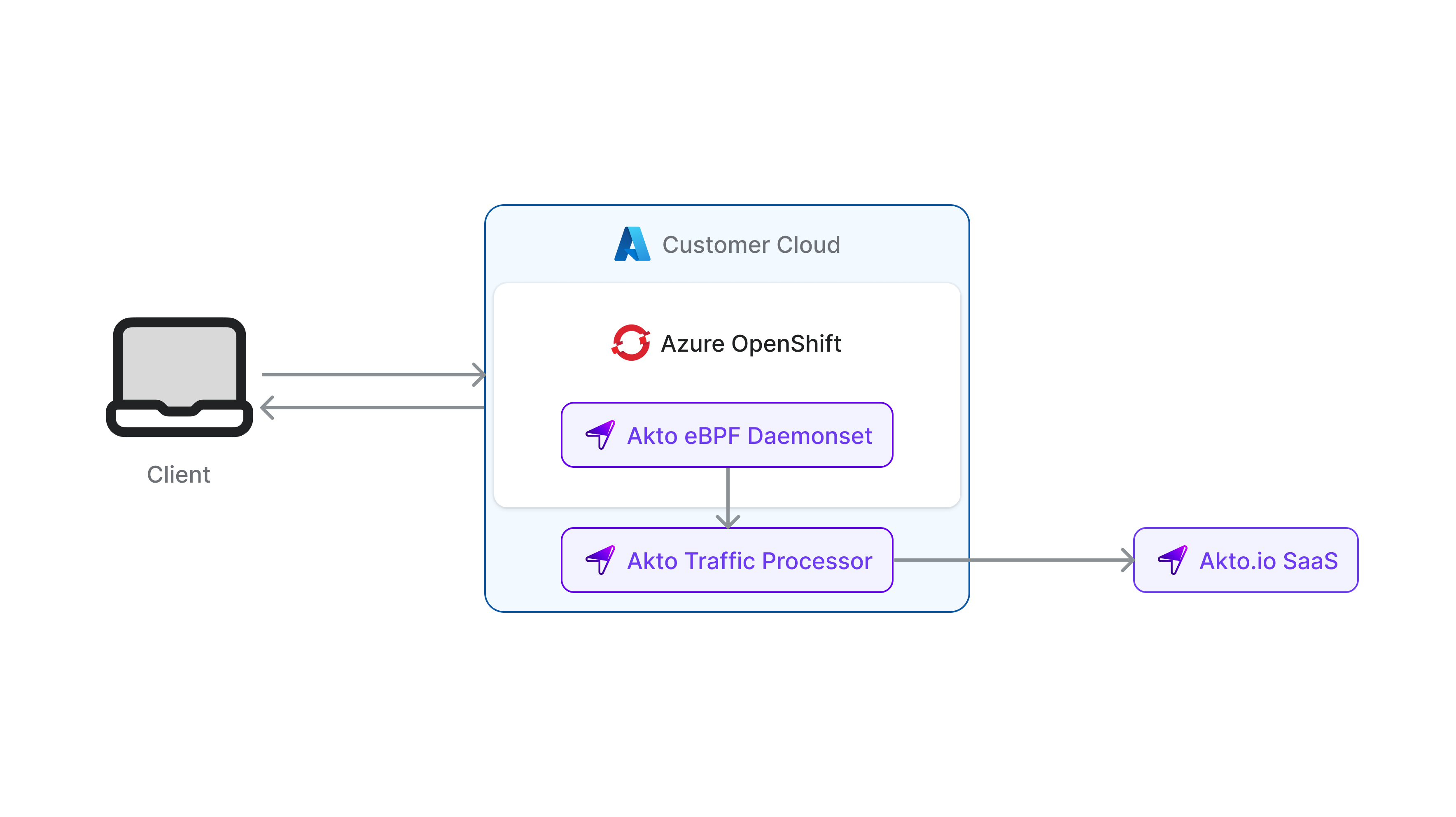
Azure Red Hat OpenShift provides highly available, fully managed OpenShift clusters on demand, monitored and operated jointly by Microsoft and Red Hat.
1. [Add service account](#service-account-manifest) to get permissions for traffic connector.
2. You can use [Kubernetes Daemonset connector](/traffic-connector/kubernetes/kubernetes.md) or [eBPF on mTLS](/traffic-connector/ebpf/ebpf-mtls.md) as your traffic connector.
Add the following to the Daemonset connector -
> They listen to `any` interface by default - which might NOT be allowed in some Openshift clusters. If that's the case, contact - we can help listen traffic on `br-ex` interface.
```yaml
containers:
- name: mirror-api-logging
...
# add the following lines to add additional privileges
privileged: true
securityContext:
runAsUser: 0
privileged: true
```
#### Service account manifest
On Openshift, for a pod to be able to listen to node traffic (eg. a daemonset pod), it needs to be assigned some special permissions.
1\. Create a Service Account
```yaml
apiVersion: v1
kind: ServiceAccount
metadata:
name: akto-daemonset-serviceaccount
annotations:
"scc.openshift.io/scc": "akto-daemonset-scc"
```
2. Create a Security Context Constraint. Substitute \ with Akto daemonset yaml namespace.
```yaml
apiVersion: security.openshift.io/v1
kind: SecurityContextConstraints
metadata:
name: akto-daemonset-scc
allowPrivilegedContainer: true
allowHostNetwork: true
requiredDropCapabilities:
- NET_ADMIN
seLinuxContext:
type: RunAsAny
runAsUser:
type: RunAsAny
runAsUser:
type: RunAsAny
seLinuxContext:
type: MustRunAs
users:
- system:serviceaccount::akto-daemonset-serviceaccount
```
3. Add SCC to service account
```bash
oc adm policy add-scc-to-user akto-daemonset-scc -z akto-daemonset-serviceaccount
```