> For the complete documentation index, see [llms.txt](https://docs.akto.io/llms.txt). Markdown versions of documentation pages are available by appending `.md` to page URLs; this page is available as [Markdown](https://docs.akto.io/api-security-testing/how-to/run-bulk-testing.md).
# Run Bulk Testing
## Overview
Bulk Testing allows you to execute security tests across many API endpoints in a single operation. Platform and security teams can use Bulk Testing to validate large API inventories without running tests individually. Bulk execution helps evaluate API security posture quickly and identify vulnerabilities across entire API collections.
Akto runs selected tests against all chosen endpoints and reports results in the testing dashboard.
### Access Bulk Testing from API Collections
Bulk Testing is available inside the API Collections view.
{% stepper %}
{% step %}
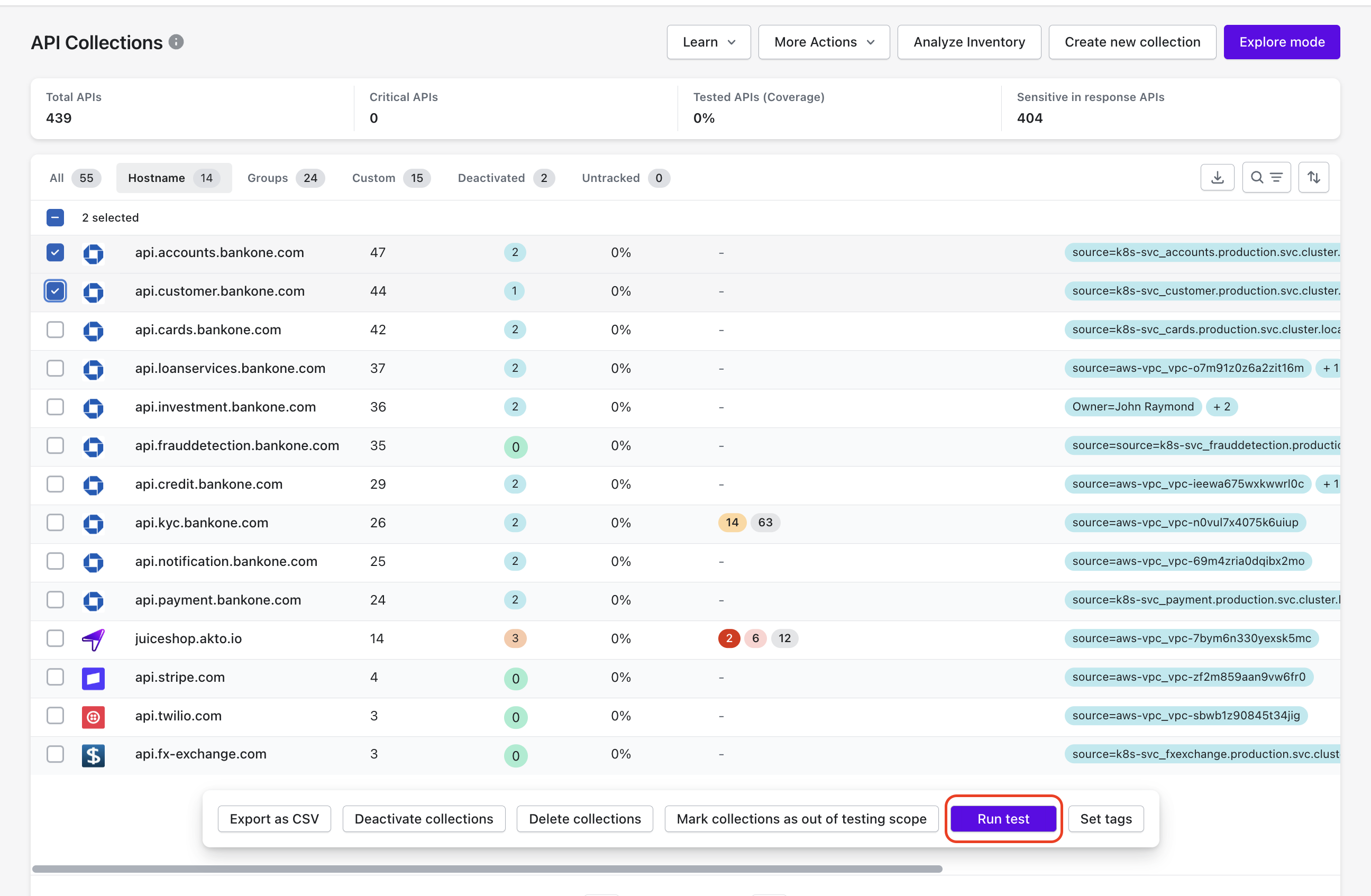
Navigate to **API Discovery** in the Akto dashboard.
{% endstep %}
{% step %}
Open **API Collections**.
{% endstep %}
{% step %}
Select the collection containing the APIs you want to test.
{% endstep %}
{% step %}
Select multiple endpoints from the collection list.
{% endstep %}
{% step %}
Click **Run Tests** from the bulk actions menu.
{% endstep %}
{% endstepper %}
Akto opens the **Bulk Test configuration panel**.
## Configure Test Parameters for Bulk Execution
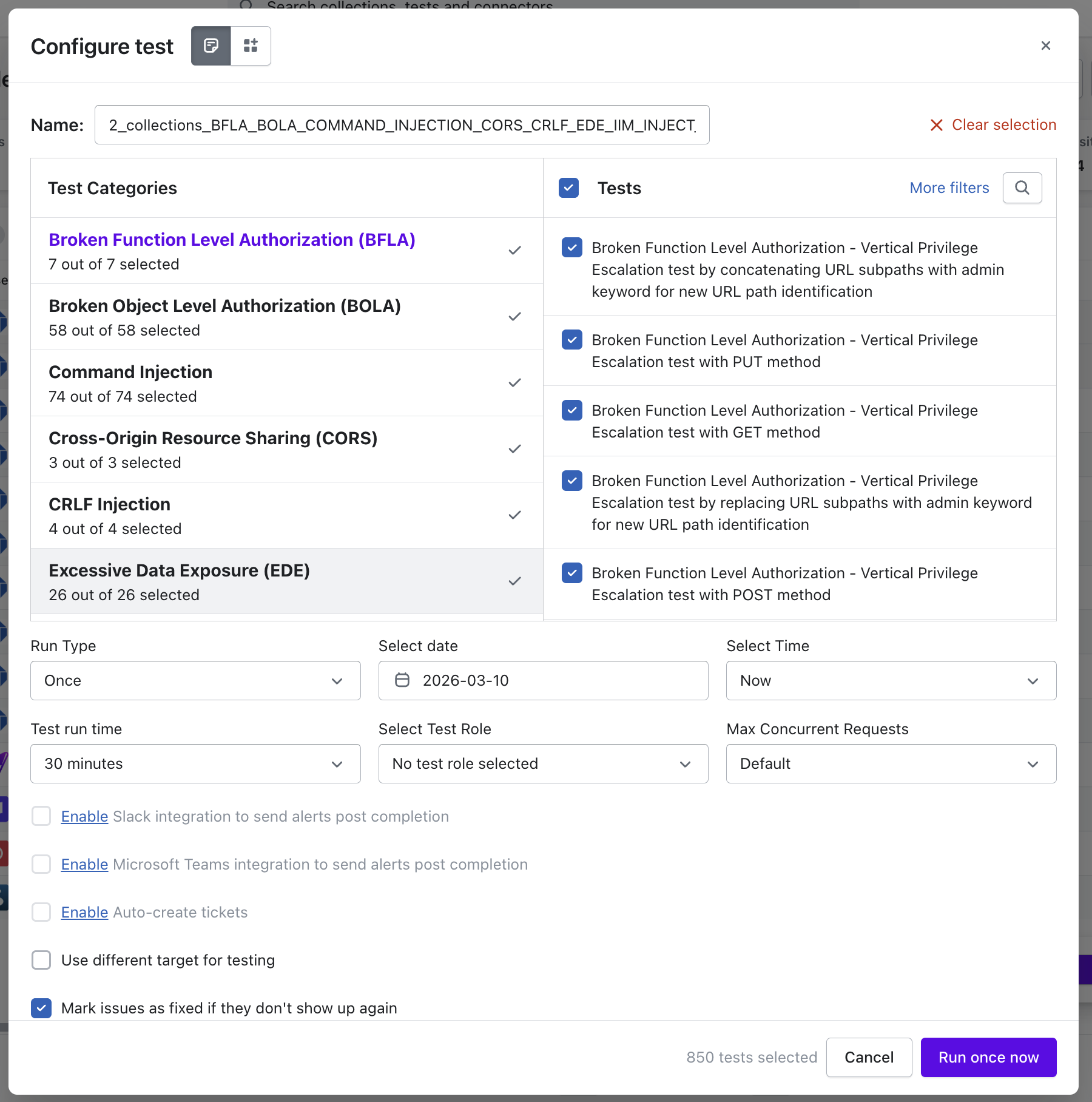
The **Configure Test** panel allows enterprise security and platform teams to define which API security tests Akto executes and how Akto performs the scan across selected APIs.
You can configure the following parameters:
* **Test Categories and Tests**\
Select API security categories such as **Broken Function Level Authorization (BFLA)**, **Broken Object Level Authorization (BOLA)**, **Command Injection**, **CORS**, **CRLF Injection**, and **Excessive Data Exposure (EDE)**.\
You may also select or deselect individual tests within each category.
* **Run Type**\
Select whether Akto executes the test **once** or schedules the execution for a specific **date and time**.
* **Test Run Time**\
Define the maximum duration allowed for test execution.
* **Test Role**\
Select the role used for authentication and authorization during test execution.
* **Max Concurrent Requests**\
Define how many test requests Akto sends simultaneously during execution.
* **Alert and Ticket Integrations**\
You can enable **Slack alerts**, **Microsoft Teams alerts**, or **automatic ticket creation** after scan completion.
* **Use Different Target for Testing**\
You may configure an alternate target environment for test execution.
* **Automatic Issue Resolution**\
Enable **Mark issues as fixed if they don't show up again** to automatically close findings when subsequent scans no longer reproduce the issue.
After configuration, select **Run once now** to start the API security test execution.
## Review Bulk Test Results
Akto aggregates results from all tested endpoints and displays findings in the **API Securiy Testing Dashboard**.
You can:
* Identify vulnerabilities across multiple APIs.
* Investigate individual endpoint test results.
* Prioritize remediation based on severity.
Bulk Testing enables enterprise security teams to evaluate API security coverage across large API inventories efficiently.