> For the complete documentation index, see [llms.txt](https://docs.akto.io/llms.txt). Markdown versions of documentation pages are available by appending `.md` to page URLs; this page is available as [Markdown](https://docs.akto.io/api-security-testing/how-to/install-testing-module-in-your-cloud/install-testing-module-as-a-statefulset.md).
# Install testing module as a StatefulSet
## Introduction
You can install the Akto testing module in your Kubernetes cluster using the `akto-stateful-mini-testing` Helm chart. It runs the testing module as a Kubernetes **StatefulSet** and connects it to a Kafka broker that uses SASL authentication.
Use this chart when you want a testing pod that keeps a stable name and can continue a running test after a restart.
## How it works
A regular Kubernetes Deployment gives pods random names, and a replacement pod starts with no history. This chart works differently:
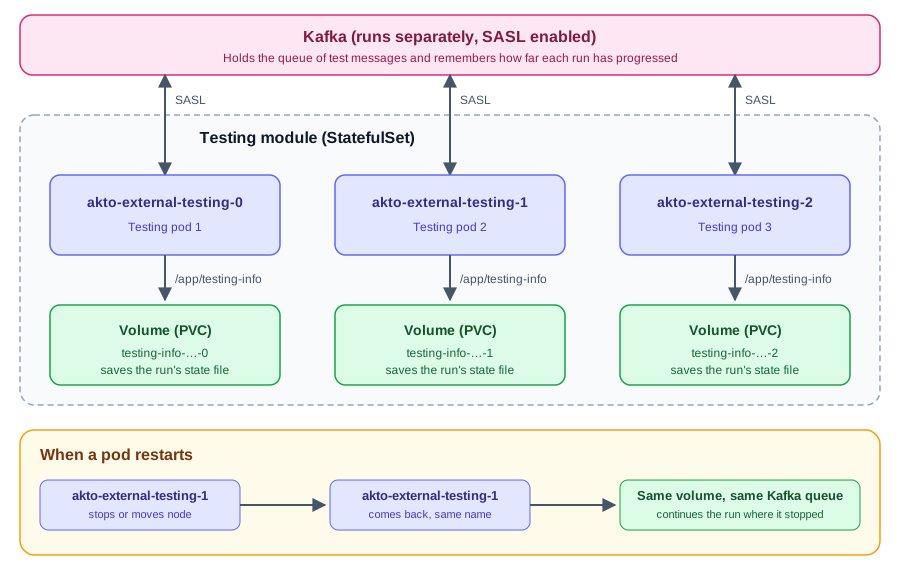
* **Stable pod names**: pods are named `akto-external-testing-0`, `akto-external-testing-1`, and so on. A pod keeps the same name when it restarts or moves to another node.
* **One storage volume per pod**: each testing pod saves the state of its current test run in the `/app/testing-info` folder. The chart creates a separate PersistentVolumeClaim (PVC) for every pod, 100Mi by default. Pods never share a volume.
* **Kafka runs separately**: the queue of test messages and the progress of each run are kept in a Kafka broker that runs outside the testing pod. The testing pod connects to it using SASL.
* **Restarts are safe**: when a pod restarts, it re-attaches to its own volume, reconnects to Kafka, and continues the run where it stopped instead of starting over.
* **Scaling up**: each extra pod gets its own new volume.
* **Scaling down or uninstalling**: volumes are not deleted automatically, so nothing is lost by accident. See [Uninstall](#uninstall) to remove them.
## Prerequisites
1. A Kubernetes cluster where you have permission to deploy.
2. [Helm](https://helm.sh/docs/intro/install/) installed.
3. A default storage class in your cluster that can create volumes. Most managed clusters (EKS, GKE, AKS) already have one. You can check with `kubectl get storageclass`.
4. A Kafka broker with SASL enabled that the testing pod can reach. You need its address, the SASL mechanism (`PLAIN`, `SCRAM-SHA-256` or `SCRAM-SHA-512`), and a SASL username and password. If you do not have a Kafka broker yet, see [Set up Kafka](#set-up-kafka-if-you-do-not-have-one) and do that first.
5. The Database Abstractor service is reachable from the cluster. You will pass its URL during install.
6. Your Database Abstractor Token:
1. Log in to the Akto dashboard at [app.akto.io](https://app.akto.io).
2. Go to **Quick Start** > **Hybrid Saas** and click **Connect**.
3. Copy the JWT token. It is also called the `Database Abstractor Token`.
## Step 1: Install the testing module
1. Add the Akto Helm repository.
```bash
helm repo add akto https://akto-api-security.github.io/helm-charts/
```
If you have already added it, update it instead:
```bash
helm repo update akto
```
2. Create a secret with your Kafka username and password.
```bash
kubectl create secret generic kafka-sasl-credentials -n \
--from-literal=username= \
--from-literal=password=""
```
3. Install the chart. Use your Kafka broker address and the secret from the previous step.
```bash
helm install akto-stateful-mini-testing akto/akto-stateful-mini-testing -n \
--set testing.aktoApiSecurityTesting.env.databaseAbstractorToken="" \
--set testing.aktoApiSecurityTesting.env.databaseAbstractorUrl="" \
--set testing.aktoApiSecurityTesting.env.kafkaBrokerUrl=":9092" \
--set testing.kafka1.env.saslMechanism="SCRAM-SHA-512" \
--set testing.kafka1.env.useSecretsForSaslCredentials=true \
--set testing.kafka1.env.saslCredentialsSecrets.existingSecret="kafka-sasl-credentials"
```
4. Check that it is running.
```bash
kubectl get pods -n
kubectl get pvc -n
```
You should see:
* a pod named `akto-external-testing-0` in the `Running` state, and
* a PVC named `testing-info-akto-external-testing-0` in the `Bound` state.
## Database Abstractor Token
By default, the token is passed directly with `--set ...databaseAbstractorToken=`, as in the install command above. You can store it in a Kubernetes secret instead. Pick one option and add its flags to the `helm install` command.
| Option | Flags |
| --------------------------------------------------------------- | ----------------------------------------------------------------------------------------------------------------------------------------------------------------------------------------- |
| **Use a secret you created**. The secret needs the key `token`. | `--set testing.aktoApiSecurityTesting.env.useSecretsForDatabaseAbstractorToken=true --set testing.aktoApiSecurityTesting.env.databaseAbstractorTokenSecrets.existingSecret=` |
| **Pass the token directly** | `--set testing.aktoApiSecurityTesting.env.databaseAbstractorToken=` |
To create your own secret:
```bash
kubectl create secret generic akto-database-abstractor-token -n \
--from-literal=token=""
```
## Kafka credentials
The testing module reads the Kafka username and password from a secret or from values you pass directly. Pick one and add its flags to the `helm install` command.
| Option | Flags |
| ---------------------------------------------------------------------------------- | ----------------------------------------------------------------------------------------------------------------------------------------- |
| **Use a secret you created**. The secret needs the keys `username` and `password`. | `--set testing.kafka1.env.useSecretsForSaslCredentials=true --set testing.kafka1.env.saslCredentialsSecrets.existingSecret=` |
| **Pass the values directly** | `--set testing.kafka1.env.saslUsername= --set testing.kafka1.env.saslPassword=` |
The default SASL mechanism is `SCRAM-SHA-512`. To use another one, set `testing.kafka1.env.saslMechanism` to `PLAIN` or `SCRAM-SHA-256`. If your Kafka does not use SASL, set `testing.kafka1.useSasl=false`.
## Options
Add these flags to the `helm install` command as needed.
| Goal | Flag |
| ---------------------------------------- | ---------------------------------------------------------------------------------------------------- |
| Set the Database Abstractor service URL | `--set testing.aktoApiSecurityTesting.env.databaseAbstractorUrl=""` |
| Run more than one testing pod | `--set testing.replicas=` |
| Run multiple tests in parallel | `--set testing.aktoApiSecurityTesting.env.concurrentTesting=true` |
| Use a specific storage class | `--set testing.persistence.storageClass=` |
| Change the volume size (default `100Mi`) | `--set testing.persistence.size=` |
| Use a proxy | `--set tokens.env.proxyUri="" --set tokens.env.noProxy=""` |
For example, to run 3 pods that run tests in parallel:
```bash
helm install akto-stateful-mini-testing akto/akto-stateful-mini-testing -n \
--set testing.aktoApiSecurityTesting.env.databaseAbstractorToken="" \
--set testing.aktoApiSecurityTesting.env.databaseAbstractorUrl="" \
--set testing.aktoApiSecurityTesting.env.kafkaBrokerUrl=":9092" \
--set testing.kafka1.env.useSecretsForSaslCredentials=true \
--set testing.kafka1.env.saslCredentialsSecrets.existingSecret="kafka-sasl-credentials" \
--set testing.replicas=3 \
--set testing.aktoApiSecurityTesting.env.concurrentTesting=true
```
This creates pods `akto-external-testing-0`, `-1` and `-2`, each with its own volume.
## Uninstall
1. Remove the testing module.
```bash
helm uninstall akto-stateful-mini-testing -n
```
2. The volumes are kept after uninstall. If you no longer need the data, delete them too.
```bash
kubectl delete pvc -n -l app=-akto-stateful-mini-testing
```
{% hint style="warning" %}
Deleting the volumes removes the saved state of each testing pod. A pod installed again afterwards starts fresh.
{% endhint %}
If you created Kafka with the example in [Set up Kafka](#set-up-kafka-if-you-do-not-have-one), remove it with `kubectl delete -f kafka-sasl.yaml`.
## Set up Kafka (if you do not have one)
If your organization already runs a Kafka broker with SASL, skip this section and use it in [Step 1](#step-1-install-the-testing-module). Otherwise, set one up before you install the testing module. The testing module needs a Kafka broker that it can reach from inside the cluster, and you need:
* the broker address, for example `kafka-sasl..svc.cluster.local:9092`
* the SASL mechanism: `PLAIN`, `SCRAM-SHA-256` or `SCRAM-SHA-512`
* a SASL username and password
{% hint style="info" %}
Kafka keeps the queue of test messages. Use a Kafka that stores its data on a persistent volume. If Kafka restarts and loses its data while a run is in progress, the run cannot continue.
{% endhint %}
If you do not have a Kafka broker yet, you can use the example below. It starts a single broker with SCRAM-SHA-512 authentication. It does not use a persistent volume, so use it for trying things out, or add a volume for `/var/lib/kafka/data` for long-term use.
1. Create a secret with the Kafka username and password. The testing module will use the same secret, so skip this if you already created `kafka-sasl-credentials`.
```bash
kubectl create secret generic kafka-sasl-credentials -n \
--from-literal=username=akto \
--from-literal=password=""
```
2. Save the following as `kafka-sasl.yaml`, replace ``, and apply it with `kubectl apply -f kafka-sasl.yaml`.
```yaml
apiVersion: apps/v1
kind: Deployment
metadata:
name: kafka-sasl
namespace:
spec:
replicas: 1
strategy:
type: Recreate
selector:
matchLabels:
app: kafka-sasl
template:
metadata:
labels:
app: kafka-sasl
annotations:
sidecar.istio.io/inject: "false"
spec:
containers:
- name: kafka
image: public.ecr.aws/aktosecurity/confluentinc-cp-kafka:8.2.2-1-ubi9
command:
- bash
- -c
- |
cat > /tmp/kafka_server_jaas.conf <.svc.cluster.local:9092"
- name: KAFKA_LISTENER_SECURITY_PROTOCOL_MAP
value: "CONTROLLER:PLAINTEXT,SASL:SASL_PLAINTEXT"
- name: KAFKA_INTER_BROKER_LISTENER_NAME
value: "SASL"
- name: KAFKA_SASL_ENABLED_MECHANISMS
value: "SCRAM-SHA-512"
- name: KAFKA_SASL_MECHANISM_INTER_BROKER_PROTOCOL
value: "SCRAM-SHA-512"
- name: KAFKA_CREATE_TOPICS
value: "akto.test.messages:1:1"
- name: KAFKA_CLEANUP_POLICY
value: "delete"
- name: KAFKA_LOG_CLEANER_ENABLE
value: "true"
- name: KAFKA_LOG_RETENTION_BYTES
value: "10737418240"
- name: KAFKA_LOG_RETENTION_CHECK_INTERVAL_MS
value: "60000"
- name: KAFKA_LOG_RETENTION_HOURS
value: "5"
- name: KAFKA_LOG_SEGMENT_BYTES
value: "104857600"
- name: KAFKA_OFFSETS_TOPIC_REPLICATION_FACTOR
value: "1"
- name: KAFKA_TRANSACTION_STATE_LOG_MIN_ISR
value: "1"
- name: KAFKA_TRANSACTION_STATE_LOG_REPLICATION_FACTOR
value: "1"
ports:
- containerPort: 9092
resources:
requests: {cpu: "500m", memory: 1Gi}
limits: {cpu: "2", memory: 4Gi}
---
apiVersion: v1
kind: Service
metadata:
name: kafka-sasl
namespace:
spec:
selector:
app: kafka-sasl
ports:
- name: tcp-kafka
port: 9092
targetPort: 9092
```
3. Check that Kafka is running.
```bash
kubectl get pods -n -l app=kafka-sasl
```
The broker address is now `kafka-sasl..svc.cluster.local:9092`. Use it as `kafkaBrokerUrl` in [Step 1](#step-1-install-the-testing-module).
## Troubleshooting
| Problem | What to check |
| ------------------------------------------------ | ------------------------------------------------------------------------------------------------------------------------------------------------------------------------------------- |
| Pod stays `Pending` | Run `kubectl describe pvc -n `. The cluster likely has no default storage class. Set one with `testing.persistence.storageClass`. |
| Pod cannot connect to Kafka | Check `kafkaBrokerUrl` and that the pod can reach the broker. Look for connection errors in the logs: `kubectl logs -c akto-api-security-testing -n `. |
| Kafka authentication fails | Check that the username, password and mechanism match what the broker expects. A message like `SaslAuthenticationException` in the logs means the credentials or mechanism are wrong. |
| Pod fails with `CreateContainerConfigError` | The secret named in `existingSecret` does not exist in the namespace, or it is missing a key. The Kafka secret needs `username` and `password`. The token secret needs `token`. |
| Run stays at 0% after a restart | Kafka lost its data. Use a Kafka that stores its data on a persistent volume. |
| Pod cannot reach the Database Abstractor service | Make sure the Database Abstractor service is reachable from the cluster. If you use a proxy, set `tokens.env.proxyUri`. |
## Need help?
Contact us at `help@akto.io` or on [Discord](https://www.akto.io/community).